Play your videos, music and pictures from Dropbox
Disclaimer
This add-on is not affiliated with or endorsed by Dropbox.
Description
Browse your Dropbox in Kodi and play your videos, music and pictures. - Any number of Dropbox accounts - Search your Dropbox - Subtitles stored next to your videos are loaded automatically - Export videos and music to the Kodi library (.strm files) - Use Dropbox as a source - Read-only: the add-on never changes or deletes your files Sign in from your phone or computer with a short code shown in Kodi.
News
v1.0.7 released Oct 24, 2026: - The remove dialog says revoking only signs out this Kodi - Requires clouddrive.common 1.5.11 v1.0.6 released Oct 24, 2026: - Removing an account can also revoke the add-on's access to your Dropbox account - Requires clouddrive.common 1.5.10 v1.0.5 released Oct 16, 2026: - Use Dropbox as a source in Kodi's file manager works: files play, and the source server moved to port 8588 so it can run next to Google Drive's - Requires clouddrive.common 1.5.7 v1.0.4 released Oct 16, 2026: - Much faster exports to the library: a folder tree is listed in one request - Requires clouddrive.common 1.5.6 v1.0.3 released Oct 15, 2026: - Swedish translation (thanks to Daniel Nylander) v1.0.2 released Oct 15, 2026: - New icon and fanart v1.0.1 released Oct 12, 2026: - Only subtitles named after the video are loaded - Requires clouddrive.common 1.5.4 (storage and stability fixes) v1.0.0 released Oct 11, 2026: - First release
How To Install
Direct installation
Via Repository
Via Directory
- Download the addon.
- Open up Kodi and navigate into Add-ons.

- Click the open box icon (above the side-menu).
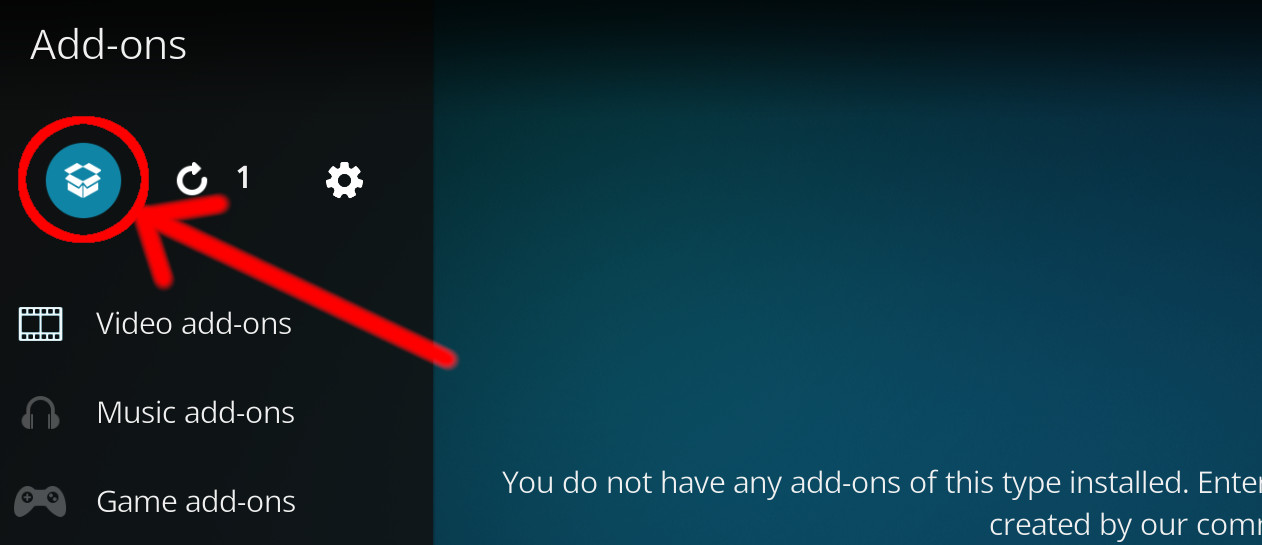
- Select Install from zip file.
- If this is the first addon you install, Kodi will warn you about installing addons from "unknown sources" for security reasons - it's your call.
- In any case, Kodi will warn you, you may not get auto-updates for this addon.
- Navigate into the location where you've downloaded the addon to and select it to Install.
For a full installation guide please click here.
Additional Information
| Updated: | October 26, 2026 |
In Repositories: |
|
| Platform: | all |
Alternative Sources: | Download 1 |
| License: | GPL-3.0-or-later |
Depends On: |