Optional helper for KarmaMole's Kodi skins: art colours, soft art, album spines, queue reordering and a genre wheel.
Disclaimer
Made for KarmaMole's Kodi skins. Other skins can opt in; see the API notes in the source repository.
Description
An optional helper for KarmaMole's Kodi skins. Each skin turns on only the features it uses, and every skin works fully without it. The features: the colours of the focused and the playing album's art, with a soft, blurred copy of the art to light the screen; a coloured spine for every album in the music library; reordering of the Up next queue; the library's genres, styles and moods with album counts, ready to play as a shuffled mix. While a skin that uses none of them is active, the helper stays idle. Album colours, soft art and spines use the Python Imaging Library (script.module.pil), which Kodi installs with it.
News
1.0.3 - Fix: two helper jobs saving the same file at the same moment could collide and show a "KarmaMole Skin Helper error" pop-up. Each save now uses its own temporary file and retries briefly if the file is busy. 1.0.2 - Fix: Kodi 21 could crash a few seconds after switching views while art colours were on (seen in Groove). The focused item's art is now read on Kodi's GUI thread (JSON-RPC XBMC.GetInfoLabels) instead of xbmc.getInfoLabel, which reads the view without a lock while Kodi swaps it. 1.0.1 - Fixes from the Kodi repository review: a failed library request no longer leaves the genre wheel and the spines empty until the library changes; Up next moves and removals are ignored once the music has stopped, instead of changing the wrong songs; cover loading uses its own temporary file per request; soft art still on screen is never pruned; refresh re-reads replaced covers; a skin switch stops a spine build at once; a shuffled mix of a very large folder says when only part of it was queued. 1.0.0 - First release as the shared KarmaMole Skin Helper (it was the Groove helper): art colours with soft art, album spines, Up next reordering, genre/style/mood wheel and true shuffle, each turned on per skin. Shuffled mixes are put in a random order by the helper, so Kodi's own shuffle setting is never changed.
How To Install
Direct installation
Via Repository
Via Directory
- Download the addon.
- Open up Kodi and navigate into Add-ons.

- Click the open box icon (above the side-menu).
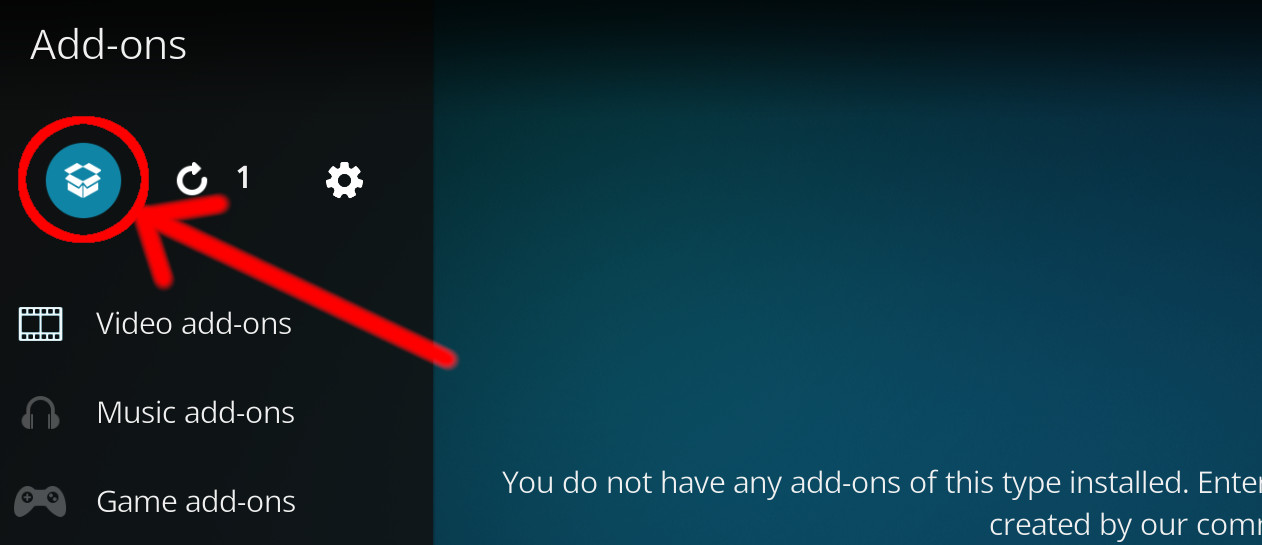
- Select Install from zip file.
- If this is the first addon you install, Kodi will warn you about installing addons from "unknown sources" for security reasons - it's your call.
- In any case, Kodi will warn you, you may not get auto-updates for this addon.
- Navigate into the location where you've downloaded the addon to and select it to Install.
For a full installation guide please click here.
Additional Information
| Updated: | November 01, 2026 |
In Repositories: |
|
| Platform: | all |
Alternative Sources: | Download 1 |
| License: | GPL-2.0-or-later |
Depends On: |