Help other people decide, vote up or down?
Scan your libraries for new content
Description
Triggers the video and/or music library scan, the same as Kodi's "Update library on startup" option. Only sources with a content type (scraper) set are scanned. When finished, a summary shows how many items were added. Run it from Add-ons > Program add-ons, or add it to your favourites to launch it from the home screen. Developed by jairamrb.com
News
Version 1.0.0 - Manual video and music library scan - Summary with the new content found - English and Spanish translations
How To Install
Direct installation
Via Repository
Via Directory
- Download the addon.
- Open up Kodi and navigate into Add-ons.

- Click the open box icon (above the side-menu).
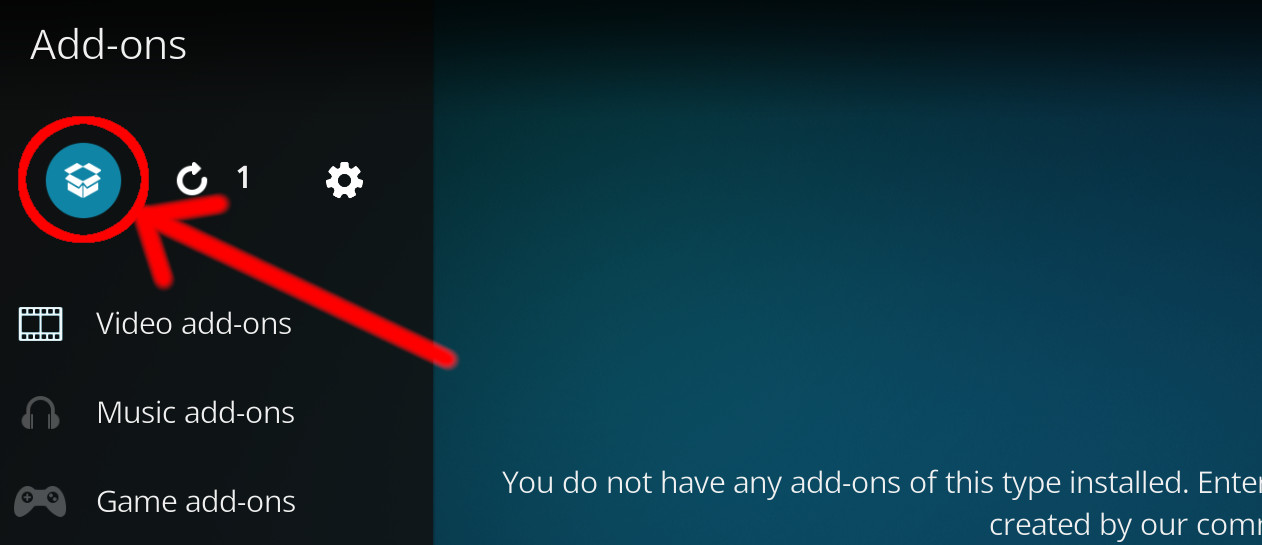
- Select Install from zip file.
- If this is the first addon you install, Kodi will warn you about installing addons from "unknown sources" for security reasons - it's your call.
- In any case, Kodi will warn you, you may not get auto-updates for this addon.
- Navigate into the location where you've downloaded the addon to and select it to Install.
For a full installation guide please click here.
Additional Information
| Updated: | November 04, 2026 |
In Repositories: |
|
| Platform: | all |
| License: | GPL-2.0-or-later |
Depends On: |