Everyone in the household keeps their own watch history, through your own CrossWatch.
Description
CrossWatch (crosswatch.app) is a free, self-hosted app that keeps watch history, ratings and playback progress in sync between media servers such as Plex, Jellyfin and Emby and trackers such as Trakt and Simkl, with a profile per person. This add-on needs a running CrossWatch on your network. It reports what plays in Kodi, and who is watching, so each person's history reaches their own accounts. The viewer is worked out from smart playlist membership, the active Kodi profile, or a question when playback stops, remembered per show. Optionally, rate an episode or film after watching it. Maintained by Rouzax, not by the CrossWatch project: report add-on problems on GitHub (github.com/crosswatch-app/kodi-addon).
News
v1.0.1 (2026-10-20) - Stream addresses are cleaned more thoroughly: access tokens and passwords in them no longer reach CrossWatch or the log. - A watch is no longer lost when a proxy in front of CrossWatch shows a login or maintenance page; it is sent later. - A profile renamed in CrossWatch while something plays now also applies to that watch. - A mistyped port in the CrossWatch address shows a clear message instead of failing. - Changes in Viewers are no longer lost if CrossWatch renames someone at the same moment.
How To Install
Direct installation
Via Repository
Via Directory
- Download the addon.
- Open up Kodi and navigate into Add-ons.

- Click the open box icon (above the side-menu).
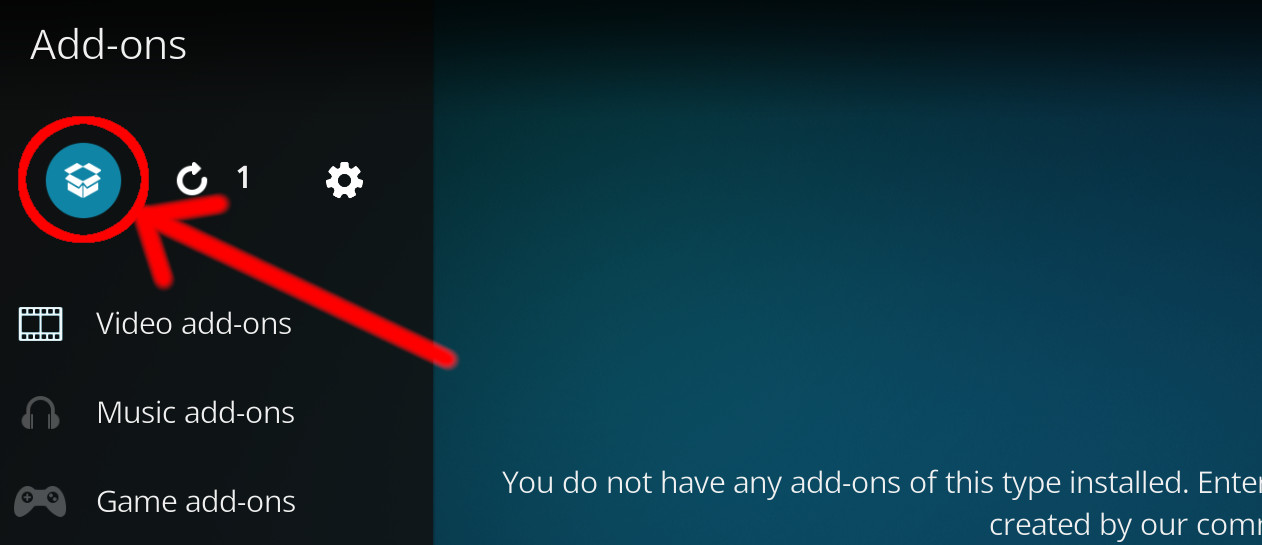
- Select Install from zip file.
- If this is the first addon you install, Kodi will warn you about installing addons from "unknown sources" for security reasons - it's your call.
- In any case, Kodi will warn you, you may not get auto-updates for this addon.
- Navigate into the location where you've downloaded the addon to and select it to Install.
For a full installation guide please click here.
Additional Information
| Updated: | October 26, 2026 |
In Repositories: |
|
| Platform: | all |
| License: | GPL-2.0-only AND Apache-2.0 |
Depends On: |