
Help other people decide, vote up or down?
Send what you watch in Kodi to Seenr
Description
Marks movies and episodes as watched on Seenr as you play them in Kodi. The add-on runs inside the player, so it knows the real playback position: nothing to confirm afterwards. Paste the connection URL from your Seenr settings (Account, Auto-tracking, Kodi) and you are done.
News
1.0.2 - First submission to the official repository - Marks movies and episodes as watched on Seenr as they are played, with the real playback position - Sends the stop of a title still loaded when Kodi closes, so nothing stays "in progress" - No analytics, no ads, no paid feature inside the add-on
View More ↓
How To Install
Direct installation
Via Repository
Via Directory
- Download the addon.
- Open up Kodi and navigate into Add-ons.

- Click the open box icon (above the side-menu).
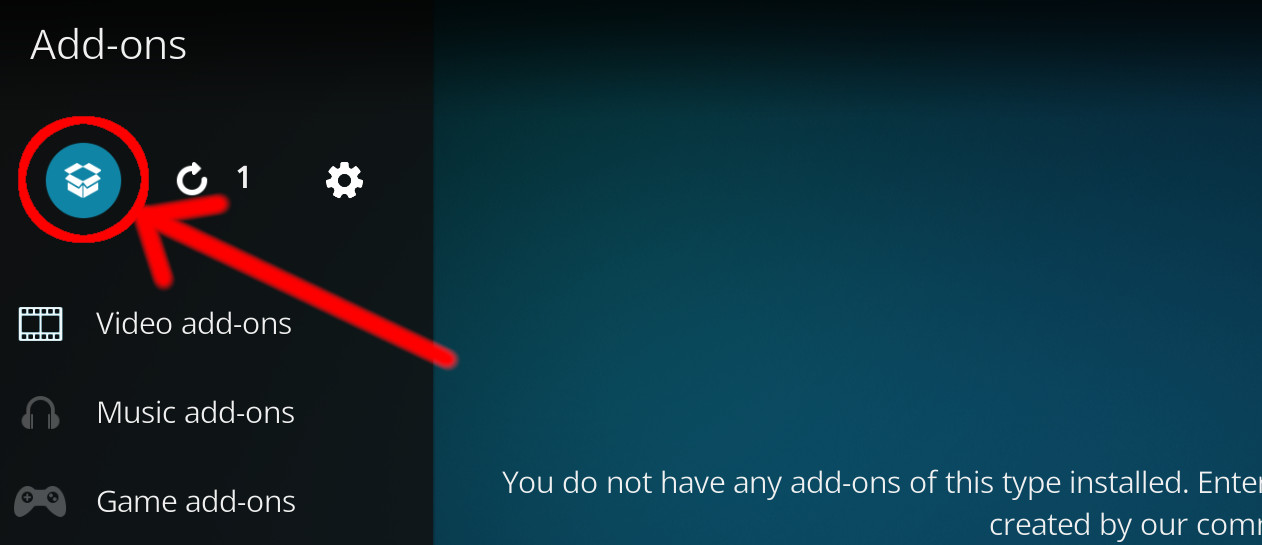
- Select Install from zip file.
- If this is the first addon you install, Kodi will warn you about installing addons from "unknown sources" for security reasons - it's your call.
- In any case, Kodi will warn you, you may not get auto-updates for this addon.
- Navigate into the location where you've downloaded the addon to and select it to Install.
For a full installation guide please click here.
Additional Information
| Updated: | November 01, 2026 |
In Repositories: |
|
| Platform: | all |
| License: | MIT |
Depends On: |


