Turn Kodi into a Music Assistant (Sendspin) speaker
Disclaimer
Unofficial community add-on. Uses the unencrypted Sendspin transition mode supported by Music Assistant 2.10 ("Allow legacy clients" must stay enabled).
Description
Registers this Kodi box as a Sendspin player with Music Assistant. Music Assistant can then stream synchronised multi-room audio to Kodi, with title, artist and artwork shown on Kodi's Now Playing screen. Pure Python, no extra dependencies - works on Android / Fire TV, LibreELEC, Windows, macOS and Linux.
News
1.0.3 - hardening against a misbehaving server: fragment and audio-queue limits, only offered audio formats accepted, shutdown never waits on a stalled server, a mistyped server URL no longer stops the service. 1.0.2 - new Kodi-Sendspin artwork (icon, fanart, banner, clear logo). 1.0.1 - robustness fixes: network message limits, safer discovery, rediscovers a moved server, cleaner reconnects. 1.0.0 - first stable release.
How To Install
Direct installation
Via Repository
Via Directory
- Download the addon.
- Open up Kodi and navigate into Add-ons.

- Click the open box icon (above the side-menu).
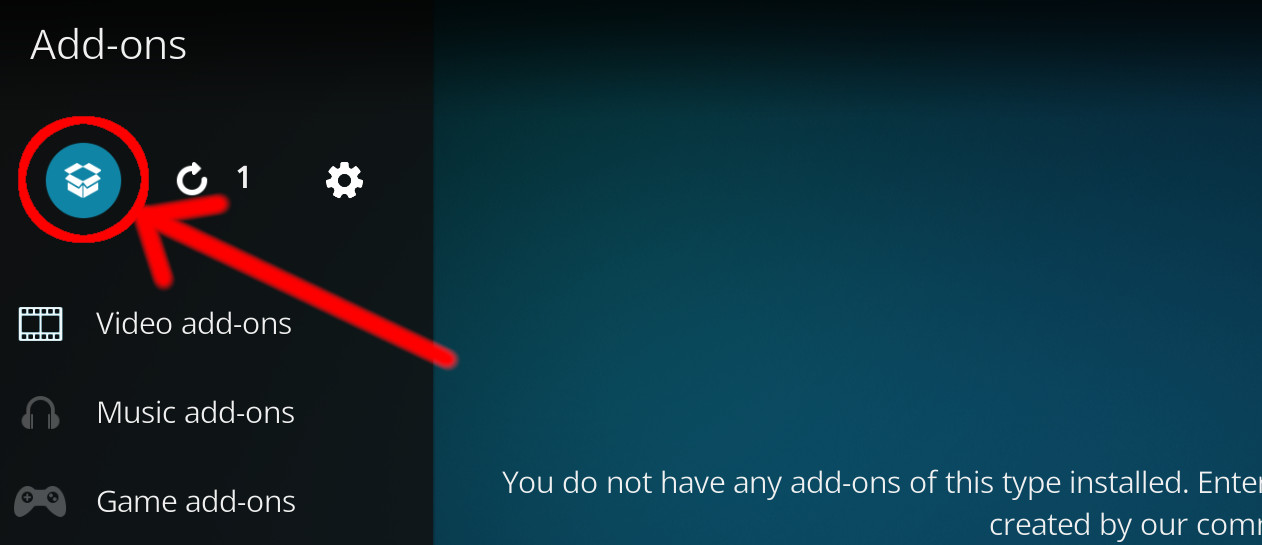
- Select Install from zip file.
- If this is the first addon you install, Kodi will warn you about installing addons from "unknown sources" for security reasons - it's your call.
- In any case, Kodi will warn you, you may not get auto-updates for this addon.
- Navigate into the location where you've downloaded the addon to and select it to Install.
For a full installation guide please click here.
Additional Information
| Updated: | October 26, 2026 |
In Repositories: |
|
| Platform: | all |
| License: | GPL-2.0-or-later |
Depends On: |


