Help other people decide, vote up or down?
Download subtitles from Thunder
Description
Search Thunder subtitles by video CID and filename, or enter a title manually. Download text subtitles and ZIP archives, with optional UTF-8 encoding and Simplified/Traditional Chinese conversion.
News
0.3.1 Add licence and source notices, replace inherited artwork and prepare official repository metadata. Remove obsolete converter command-line code. 0.3.0 Combine CID matching with HTTPS name search and support manual title lookup. Keep partial results if one search service fails.
How To Install
Direct installation
Via Repository
Via Directory
- Download the addon.
- Open up Kodi and navigate into Add-ons.

- Click the open box icon (above the side-menu).
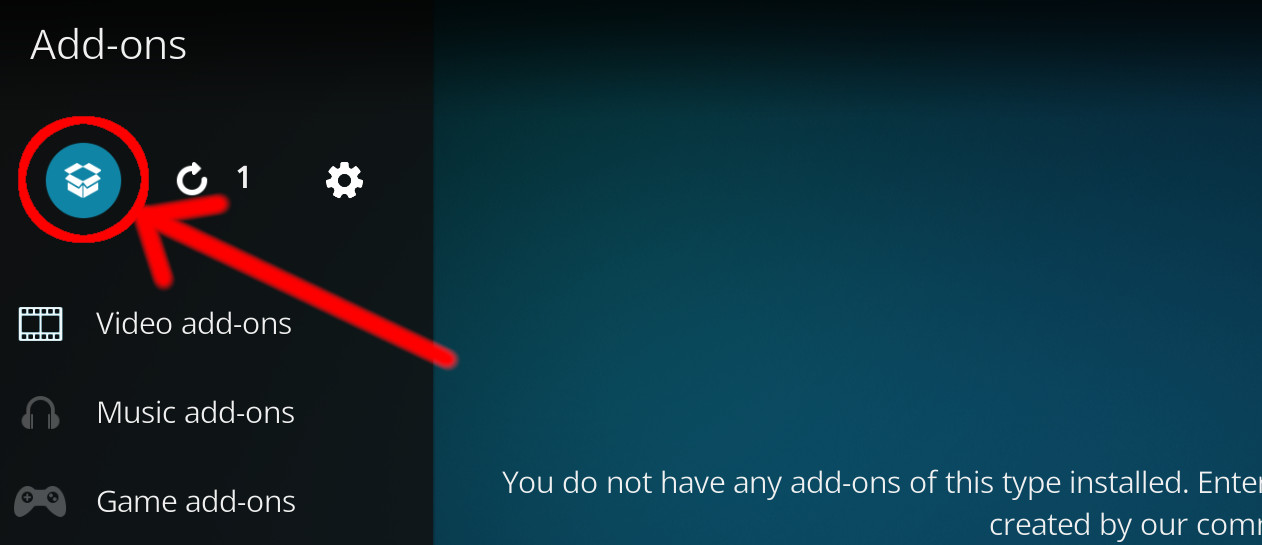
- Select Install from zip file.
- If this is the first addon you install, Kodi will warn you about installing addons from "unknown sources" for security reasons - it's your call.
- In any case, Kodi will warn you, you may not get auto-updates for this addon.
- Navigate into the location where you've downloaded the addon to and select it to Install.
For a full installation guide please click here.
Additional Information
| Updated: | November 01, 2026 |
In Repositories: |
|
| Platform: | all |
| License: | GPL-2.0-only |
Depends On: |


