Album-art colours for skins and Shadertoy visualisations.
Description
While music plays, this service takes four colours from the album cover (dominant, second, accent and shadow). Skins can read them as Window(Home).Property(VizPalette.Color1) to VizPalette.Color4. If a Shadertoy preset pack is installed, it also writes the colours and a small copy of the cover into the pack folder, so the visualisation takes on the album's colours. It does nothing for video or while idle.
News
1.1.4 - Fixes from the Kodi repository review: a Shadertoy pack folder that cannot be written no longer stops the service (skin colours keep working); a cover that fails to load, or textures that fail to write, are tried again for the same album after 5 s, 15 s, 30 s, 1 min and 2 min; choosing another pack folder writes the textures there straight away. 1.1.3 - Dark covers no longer give black colours: on an album with a black background, Color2 and Color4 used to be FF000001. Every colour is now a usable shade, the four are always different, and the shadow (Color4) is a darker shade of the main colour. 1.1.2 - The Shadertoy pack folder setting is empty by default; the pack is found automatically in Shadertoy's add-on data. 1.1.1 - The shadow colour (VizPalette.Color4) is always a darker shade: on pale covers it used to repeat the main colour. 1.1.0 - Publishes the palette as Window(Home).Property(VizPalette.Color1..4) whether or not a Shadertoy pack is installed. The pack folder is now a setting. Licensed GPL-2.0-or-later.
How To Install
Direct installation
Via Repository
Via Directory
- Download the addon.
- Open up Kodi and navigate into Add-ons.

- Click the open box icon (above the side-menu).
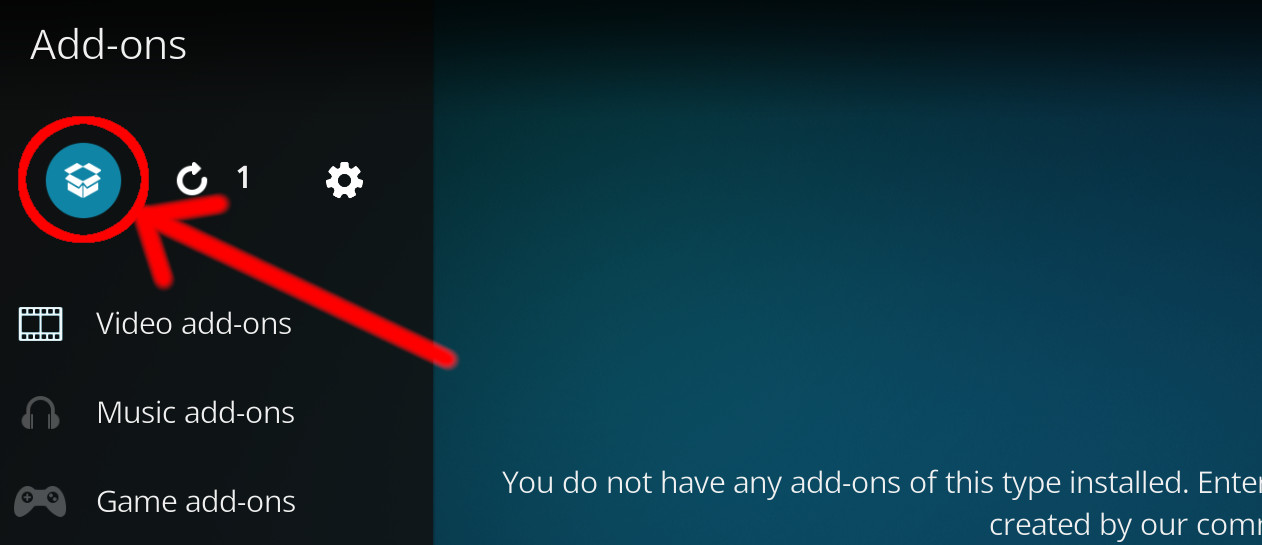
- Select Install from zip file.
- If this is the first addon you install, Kodi will warn you about installing addons from "unknown sources" for security reasons - it's your call.
- In any case, Kodi will warn you, you may not get auto-updates for this addon.
- Navigate into the location where you've downloaded the addon to and select it to Install.
For a full installation guide please click here.
Additional Information
| Updated: | November 01, 2026 |
In Repositories: |
|
| Platform: | all |
Alternative Sources: | Download 1 |
| License: | GPL-2.0-or-later |
Depends On: |


