Help other people decide, vote up or down?
X
Unlock geo-blocked content! and stay safe & annonymus online.
Some content on the Internet is blocked depending on your location. If you want to unblock content while staying safe & annonymus online - simply, install a VPN and get ready to access content you have been barred from thus far.
Download NordVPNTLBB One Click Setup
Description
Allows for a complete fresh setup with pre-installed content. These builds are provided by members of the community and will completely wipe any existing setup you have, the TLBB take no responsibility for the content provided. Please read the description of each build before installing, some may contain adult or unsuitable content.
How To Install
Direct installation
Via Repository
Via Directory
- Download the addon.
- Open up Kodi and navigate into Add-ons.

- Click the open box icon (above the side-menu).
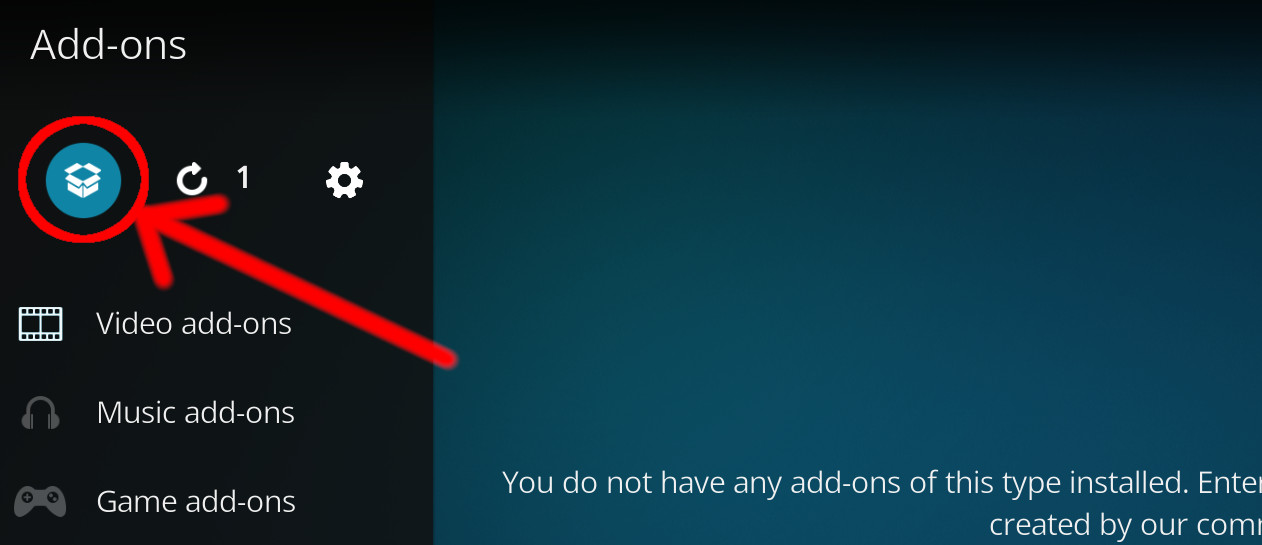
- Select Install from zip file.
- If this is the first addon you install, Kodi will warn you about installing addons from "unknown sources" for security reasons - it's your call.
- In any case, Kodi will warn you, you may not get auto-updates for this addon.
- Navigate into the location where you've downloaded the addon to and select it to Install.
For a full installation guide please click here.
Additional Information
WebsiteForumSource
| Updated: | March 22, 2021 |
In Repositories: | |
| Platform: | all |
| License: | Not specified |
Depends On: |
|